GlucoWise: When a Blood Report Scares You Into Building a Full-Stack App
Let me tell you about the moment I decided to build GlucoWise.
I was staring at my blood test results. The numbers weren't catastrophic, but they were heading in a direction I didn't like. Pre-diabetic territory. The kind of wake-up call that makes you put down the samosa and reconsider your life choices.
I knew I needed to track things—glucose readings, what I was eating, whether I was actually moving my body. But every app I tried was either bloated with features I didn't need, locked behind a subscription, or just... ugly. I wanted something that felt calm and focused. Something that would help me understand my patterns without making me feel like I was managing a spreadsheet.
So I built GlucoWise.

The Full Stack Experience
This isn't a weekend hack. GlucoWise is probably the most complete application I've ever built—end to end:
- Authentication with Clerk (because rolling your own auth is a trap)
- Real-time database with Convex (more on this in a bit)
- Custom domain at glucowise.app
- Frontend with Next.js 16, React 19, and Tailwind CSS v4
- Beautiful UI using shadcn/ui components
About 6,000 lines of production code. Not bad for a personal project born out of health anxiety.
Why Convex? Because It's Just Better.
I've used Firebase. I've used Supabase. I've wired up REST APIs and GraphQL endpoints. And honestly? Convex makes all of that feel unnecessarily complicated.
With Convex, your database queries are just TypeScript functions. You write a query, and your frontend automatically subscribes to real-time updates. No WebSocket setup, no cache invalidation headaches, no "why isn't my data updating" debugging sessions.
Here's what my schema looks like:
// readings, meals, weight, workouts, userProfile
// All tables with userId isolation enforced at the database level
Every query and mutation uses getAuthUserId to ensure users only see their own data. Simple, secure, and it just works.
What Can It Track?

Glucose Readings — Log fasting, pre-meal, post-meal, or random readings. Add notes about sleep, stress, or that cheat meal you're pretending didn't happen. Each reading gets context, so you can spot patterns like "my fasting glucose is always higher after bad sleep."
Meals — Full macronutrient tracking. Carbs, protein, fat—the whole deal. You can even link meals to glucose readings to see how specific foods affect your levels.
Weight — Track your weight over time with automatic unit conversion. I store everything in kg internally but display whatever you prefer.
Workouts — Log cardio, strength, yoga, whatever. Track duration, intensity, and estimated calories burned.
The Timeline: My Favorite Feature

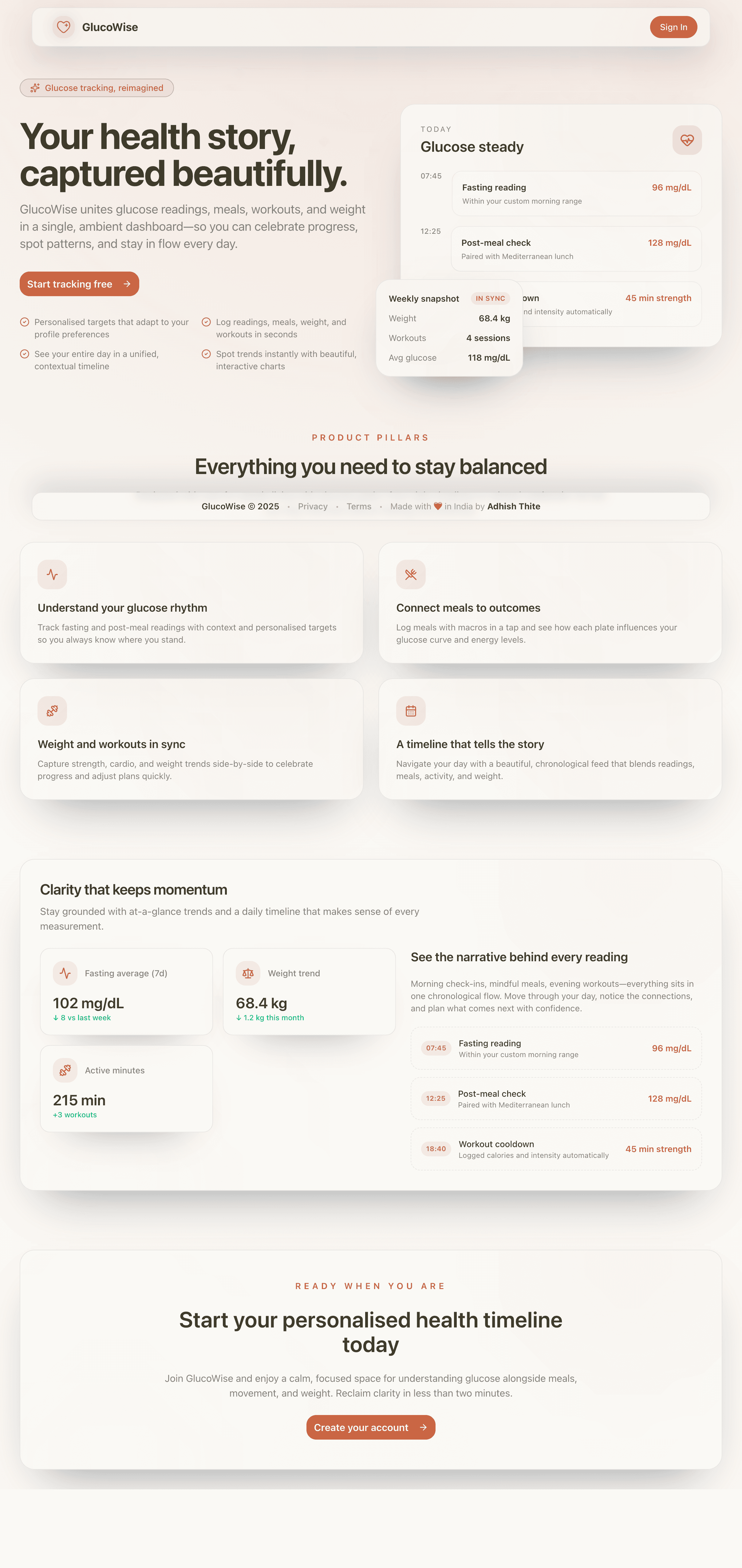
This is where it all comes together. The "Your Day" view shows everything in chronological order—glucose readings, meals, workouts, weight entries—all on a single timeline.
Each entry type has its own color. Glucose readings are red. Meals are orange. Workouts are blue. Weight entries are purple. You can navigate to any day and see your complete health story at a glance.
There's even a "Copy as Markdown" button if you want to share your day with a doctor or nutritionist. Small feature, surprisingly useful.
Personalized Everything

Everyone's glucose targets are different. Mine are different from yours. So GlucoWise lets you set custom target ranges for:
- Fasting glucose (mine is 80-110 mg/dL)
- Before-meal glucose
- Post-meal glucose
The app uses these targets to tell you when a reading is in range or when something's off. No generic "normal is 70-100" nonsense. Your targets, your context.
You can also choose between metric and imperial units, pick your preferred glucose unit (mg/dL or mmol/L), and toggle dark mode. Because it's 2025.
The Data Nerd Section

Note: All the health records shown in these screenshots are fabricated for demo purposes.
125 glucose readings and counting. Every single one with a timestamp and optional notes. I've tracked readings at 3 AM (bad idea), after walks (good idea), and after accidentally eating too much rice (lesson learned).
The readings page shows:
- Total readings across all contexts
- Average glucose with latest reading
- All-time range (mine spans 81-276 mg/dL—that 276 was a wake-up call)
- Searchable, filterable history table
You can export everything as CSV for spreadsheet analysis or back up your entire dataset as JSON. Your data, your control.
What I've Learned (Besides How to Build Apps)
Building GlucoWise taught me a lot about my own patterns:
-
Sleep matters more than I thought. My fasting glucose is consistently higher after short sleep. Like, obviously, but seeing it in data hits different.
-
Walking after meals works. Post-meal readings after a 30-minute walk are noticeably lower than when I just sit.
-
Restaurant bhakri is not the same as home bhakri. I saw a 178 spike after eating out once. That's now logged with a note: "maybe spike due to restaurant prepped-bhakri."
-
Consistency is everything. Having 119 readings over a couple months gives you actual trend data, not just random snapshots.
The Tech Stack (For the Curious)
- Next.js 16 with App Router
- React 19
- Convex for the real-time database
- Clerk for authentication
- Tailwind CSS v4 with custom design tokens
- shadcn/ui (New York style) for components
- Recharts for data visualization
- Framer Motion for subtle animations
- Biome for linting/formatting (bye, ESLint)
- Vercel for hosting
The design uses glassmorphism effects with backdrop blur, generous rounded corners, and subtle glow effects on hover. I wanted something that feels calm and premium—not clinical or sterile.
What's Next?
I'm planning to add AI-powered trend analysis. Imagine the app noticing patterns like "your glucose tends to spike on Sundays" or "your fasting readings improve when you work out the day before." The data is already there; I just need to make it smarter.
For now, though, it does exactly what I need. Track the numbers, see the patterns, make better choices.
Go Check It Out
glucowise.appIf you're dealing with glucose concerns—or just want to understand how your body responds to food, sleep, and exercise—give it a spin. It's free, it's private, and it might just scare you into making healthier choices.
Like it did for me.
Try GlucoWise